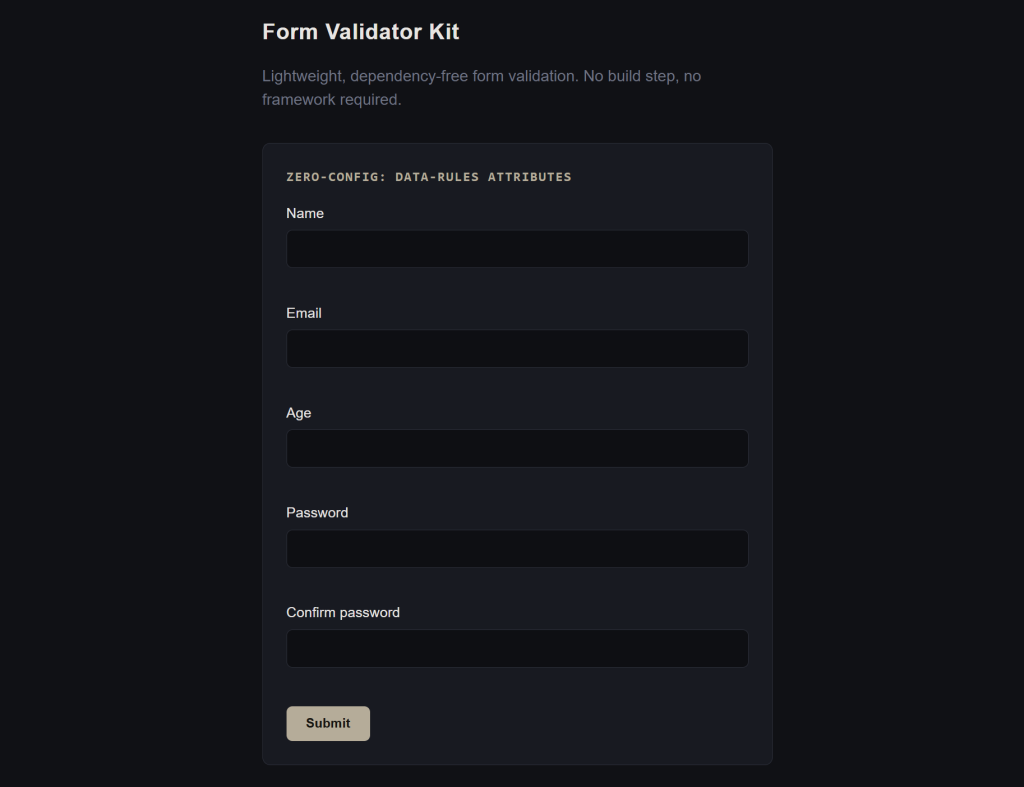
Lightweight, Dependency-Free JavaScript Form Validation
Form Validator Kit is a lightweight, dependency-free JavaScript form validation library designed to make client-side form validation simple, flexible, and easy to integrate into almost any web project.
Validate HTML forms without installing a framework, adding a build step, or pulling in a large validation dependency. Simply include the single JavaScript file and start validating form fields using straightforward validation rules.
Whether you’re building a plain HTML website, a custom JavaScript application, or working with a framework such as React, Vue, or Svelte, Form Validator Kit provides a small, framework-agnostic validation core that you can adapt to your existing frontend architecture.
Free to download. No dependencies. No build step required.
Why Use Form Validator Kit?
Form validation is a common requirement for almost every website and web application. Contact forms, registration forms, login forms, checkout forms, profile forms, surveys, and application forms all need reliable validation before data is submitted.
Many validation libraries introduce additional dependencies, complex configuration, framework-specific APIs, or build requirements.
Form Validator Kit takes a simpler approach.
Lightweight
The core JavaScript library is approximately 6KB unminified, making it suitable for projects where keeping frontend code small and focused matters.
Zero Dependencies
Form Validator Kit does not require jQuery, React, Vue, or another JavaScript library. It works independently and can be added directly to an HTML page.
No Build Step
Download the JavaScript file, include it on your page, and use it. There is no package installation or compilation process required for the basic browser-based implementation.
Framework-Agnostic
The validation engine is separated from the DOM integration, allowing you to use the core validator with your own application logic.
It can be used with plain JavaScript and adapted for applications built with frameworks such as:
- React
- Vue
- Svelte
- Node.js-based projects
- Custom JavaScript applications
- Traditional HTML websites
Attribute-Driven Validation
For standard HTML forms, validation rules can be defined directly on form fields using data-rules attributes.
For example:
<input
  name="email"
  data-rules="required|email"
>

<span data-error-for="email"></span>
Then initialize the validator:
FormValidatorKit.init();
This automatically wires forms using the data-fvk attribute.
Built-In JavaScript Validation Rules
Form Validator Kit includes a useful collection of common client-side validation rules without requiring additional plugins.
Required Fields
Ensure a field contains a value and reject empty or whitespace-only input.
required
Email Validation
Check whether a value follows a basic email address format.
email
Number Validation
Validate numeric input.
number
Integer Validation
Require a whole number rather than a decimal value.
integer
Minimum and Maximum Values
Set numeric boundaries for fields such as age, quantity, score, or other numerical values.
min:18
max:120
Minimum and Maximum Length
Control the number of characters allowed in a text field.
minLength:8
maxLength:100
Pattern Validation
Use your own regular expression when a field requires a custom format.
pattern:^[A-Z]
Matching Fields
Validate fields that need to match another field, such as password confirmation.
matches:password
URL Validation
Perform a basic URL format check.
url
Date Validation
Check whether a supplied value can be parsed as a valid date.
date
Allowed Values
Restrict a field to a predefined comma-separated list of values.
oneOf:red,green,blue
Chain Multiple Validation Rules
Multiple validation rules can be combined using the | separator.
For example:
<input
  name="age"
  data-rules="required|integer|min:18|max:120"
>
This allows you to build validation logic directly into your form markup without creating a separate configuration object for every basic HTML form.
A registration form could use rules such as:
required|minLength:8
while an email field could use:
required|email
This keeps simple validation rules readable and close to the fields they control.
Automatic Form Validation
The browser integration provides a convenient attribute-driven approach for traditional HTML forms.
Add data-fvk to your form:
<form data-fvk>
Then define validation rules on individual fields:
<input name="email" data-rules="required|email">
<span data-error-for="email"></span>
Initialize the library:
FormValidatorKit.init();
Form Validator Kit automatically:
- Finds forms using
[data-fvk] - Reads validation rules from
[data-rules] - Collects form values
- Validates fields
- Displays validation messages
- Adds
fvk-invalidandfvk-validclasses - Validates fields on blur
- Validates the complete form on submission
- Prevents invalid form submissions
- Focuses the first invalid field
This provides a straightforward client-side validation experience without requiring a large UI framework.
Live Validation
By default, fields are validated when they lose focus and when the form is submitted.
This provides immediate feedback while keeping the implementation simple.
Live validation can also be disabled for a form when needed:
<form data-fvk data-live="false">
This gives developers control over when validation feedback is displayed.
Framework-Agnostic Validation Core
If you don’t want automatic DOM handling, you can use the underlying Validator class directly.
For example:
const validator = new FormValidatorKit.Validator({
  email: ['required', 'email'],
  age: ['required', 'number', 'min:18'],
});

const result = validator.validate({
  email: '[email protected]',
  age: '15'
});
The validator returns a predictable result containing the overall validity state and field-level errors:
{
  valid: false,
  errors: {
    age: ['Must be at least 18.']
  }
}
This makes the core useful when your application already manages form state and you want to control the user interface yourself.
React, Vue, Svelte and Custom Applications
Form Validator Kit does not impose a UI framework or rendering strategy.
Instead, you can use the validation core against your application’s existing state and decide how validation messages should be displayed.
For example:
const validator = new FormValidatorKit.Validator({
  email: ['required', 'email'],
  password: ['required', 'minLength:8'],
});

const result = validator.validate(formValues);
Your application can then render result.errors using its own components and styling system.
This makes the library particularly useful for developers who want JavaScript form validation without committing their entire project to a particular form library or validation framework.
Custom Validation Rules
Built-in rules cover many common requirements, but applications often have their own validation logic.
Form Validator Kit allows developers to add custom rules:
validator.addRule(
  'startsWithA',
  (value) => {
    return !value || value[0].toLowerCase() === 'a';
  },
  'Must start with the letter A.'
);
This lets you extend the validator without modifying the library’s source code.
Custom rules receive the field value, optional rule parameter, and all form values, allowing developers to implement application-specific validation logic.
Custom Validation Messages
You can also replace the default validation messages with your own wording.
For example:
const validator = new FormValidatorKit.Validator(schema, {
  messages: {
    required: "Don't leave this blank.",
    email: "That doesn't look like an email.",
  }
});
This is useful when you want validation messages to match your website’s tone, product terminology, or user experience.
Events for Custom Submission Logic
The automatic form integration exposes validation events that allow you to connect Form Validator Kit with your own application logic.
The library dispatches:
fvk:valid
when the form passes validation, and:
fvk:invalid
when validation fails.
These events can be used to connect validation with custom submission handlers, application workflows, analytics, or other frontend logic.
Minimal Styling by Design
Form Validator Kit intentionally does not impose a visual design system on your forms.
It does not ship with a large collection of CSS styles or UI components.
Instead, it provides two state classes:
fvk-invalid
fvk-valid
You can style these classes according to your own design system.
For example:
input.fvk-invalid {
  border-color: #e00;
}

input.fvk-valid {
  border-color: #0a0;
}
This means the validator can fit into an existing website without forcing a particular visual style.
What Form Validator Kit Is Designed For
Form Validator Kit is useful for a wide range of frontend form validation scenarios, including:
- Contact forms
- Registration forms
- Login forms
- Newsletter forms
- Search forms
- Profile forms
- Password confirmation
- Checkout forms
- Application forms
- Survey forms
- Custom HTML forms
- JavaScript applications
- Lightweight web applications
- Framework-based frontend applications
It is especially useful when you need simple client-side validation without a large dependency footprint.
What It Does Not Do
Form Validator Kit intentionally focuses on client-side validation and keeps its scope small.
It does not perform asynchronous or remote validation such as checking whether a username already exists on your server.
For example, “Is this username already registered?” requires communication with your backend and should be implemented separately.
Form Validator Kit also does not replace server-side validation.
Client-side validation improves user experience, but data received by a server should always be validated and sanitized again on the backend.
The library also does not impose a UI framework, CSS framework, component library, or design system.
Simple Installation
There is no package manager or build process required for the basic browser implementation.
Download the kit, include the JavaScript file:
<script src="form-validator-kit.js"></script>
and initialize it:
FormValidatorKit.init();
That’s it.
The downloadable package includes:
form-validator-kit.js— the validation librarydemo.html— a working browser demonstrationREADME.md— documentation and usage examples
Example: Complete HTML Form
A simple form can be created with validation rules directly in the markup:
<form data-fvk>

  <input
    name="email"
    data-rules="required|email"
  >

  <span data-error-for="email"></span>

  <input
    name="age"
    data-rules="required|integer|min:18|max:120"
  >

  <span data-error-for="age"></span>

  <input
    name="password"
    type="password"
    data-rules="required|minLength:8"
  >

  <span data-error-for="password"></span>

  <input
    name="confirm"
    type="password"
    data-rules="required|matches:password"
  >

  <span data-error-for="confirm"></span>

  <button type="submit">Submit</button>

</form>

<script src="form-validator-kit.js"></script>

<script>
  FormValidatorKit.init();
</script>
This gives you a functional client-side form validation layer with minimal code.
Built for Developers Who Prefer Simple Tools
Form Validator Kit follows a straightforward philosophy:
Keep validation useful, lightweight, dependency-free, and easy to integrate.
You don’t need to introduce a large form framework just to validate a few fields.
You don’t need a bundler for a simple HTML project.
You don’t need to adopt a particular CSS framework.
And you don’t need to rewrite your application’s form handling around a proprietary API.
Use the automatic HTML integration when you want convenience, or use the validation core directly when you need complete control.
Key Features
- Lightweight JavaScript form validator
- Dependency-free
- No build step required
- Works with plain HTML
- Framework-agnostic validation core
- React-friendly
- Vue-friendly
- Svelte-friendly
- Attribute-driven validation
- 12 built-in validation rules
- Required field validation
- Email validation
- Number and integer validation
- Minimum and maximum value validation
- Minimum and maximum length validation
- Regular expression pattern validation
- Password confirmation / matching fields
- URL validation
- Date validation
- Allowed-value validation
- Custom validation rules
- Custom validation messages
- Live blur validation
- Submit validation
- Custom validation events
- Automatic invalid-field focus
- Minimal CSS footprint
- No forced UI framework
- UMD-compatible distribution
- Open the included demo directly in a browser
Download Form Validator Kit
Form Validator Kit is available as a free download from Elevoire.
Download the kit, add form-validator-kit.js to your project, and start validating forms without adding another heavy dependency to your application.
Whether you’re working on a simple HTML website or a modern JavaScript application, Form Validator Kit provides a practical foundation for client-side form validation while leaving your application’s UI, styling, and submission architecture under your control.
Form Validator Kit — simple validation, without the baggage.
Technical Information
Product: Form Validator Kit
Version: 1.0.0
Type: JavaScript Library / Developer Toolkit
License: See the included project/license documentation
Dependencies: None
Build Step: Not required
Primary Use: Client-side form validation
Integration: HTML, JavaScript, React, Vue, Svelte and other JavaScript applications
Frequently Asked Questions
What is Form Validator Kit?
Form Validator Kit is a lightweight JavaScript form validation library for validating form fields on the client side. It can automatically validate HTML forms or be used as a framework-agnostic validation core.
Is Form Validator Kit free?
Yes. Form Validator Kit is provided as a free Elevoire developer toolkit.
Does Form Validator Kit require jQuery?
No. Form Validator Kit is dependency-free and does not require jQuery.
Does it require React or another framework?
No. It works with standard HTML and JavaScript. The validation core can also be integrated into React, Vue, Svelte, and other JavaScript applications.
Do I need npm or a build tool?
No. For a standard HTML implementation, you can simply include form-validator-kit.js with a <script> tag.
What validation rules are included?
The library includes required, email, number, integer, min, max, minLength, maxLength, pattern, matches, url, date, and oneOf.
Can I create custom validation rules?
Yes. The addRule() API allows developers to add custom validation functions and custom error messages.
Can I customize validation messages?
Yes. Default messages can be overridden through the validator options.
Does it work with React, Vue, or Svelte?
Yes. The core Validator class is framework-agnostic. You can validate your application state and render the returned errors using your framework’s own components.
Does it perform server-side validation?
No. Form Validator Kit is a client-side validation library. Server-side applications should independently validate and sanitize submitted data.
Does it support AJAX or remote validation?
Remote or asynchronous validation is intentionally outside the current scope of the library. You can layer your own asynchronous checks around the provided validation events and application logic.
Does it include CSS?
It does not impose a complete UI or CSS framework. The library uses the fvk-invalid and fvk-valid classes so you can apply your own styling.
Is there a demo?
Yes. The download package includes demo.html, which demonstrates both automatic HTML form validation and manual use of the validation core.